Showing posts with label Airtel. Show all posts

Wednesday, May 14, 2014

,

Airtel finally launches dedicated WhatsApp data plans starting at Rs 36 for 200MB per month

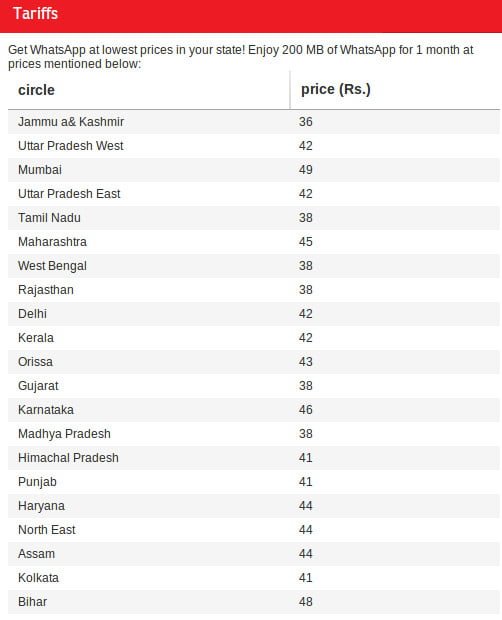
So instead of fighting over bandwidth issues with IM apps, it looks like Airtel has done what we’ve suggested last month. Airtel has finally launched dedicated WhatsApp data plans for its 2G and 3G users. Airtel is offering 200 MB of WhatsApp usage for one month starting from Rs 36 which varies according to circles. WhatsApp data plan can be activated by messaging ‘WhatsApp’ to 121.
The WhatsApp plan is priced lowest in Jammu & Kashmir circle, at Rs 36 while it is priced highest in Mumbai circle, at Rs 49. Although, we’re quite puzzled about WhatsApp data plan being unavailable for users from Andhra Pradesh circle.
Airtel WhatsApp Data Plans
Airtel WhatsApp Data Plans As Per Different Circles
Although Bharti Airtel has its own Hike Messenger IM app, its usage and market penetration isn’t as high as that of WhatsApp’s in spite of  pushing free SMS scheme that they are offering to Hike Messenger users. WhatsApp has recently crossed 50 million active users in India and more than 500 million users worldwide. WhatsApp was acquired recently by Facebook for $19 billion.Uninor, Reliance and Tata Docomo have already launched dedicated WhatsApp data plans.

Sunday, August 25, 2013

Airtel 3G And 2G Working Handler Trick All State

It work with good speed .. 


Works for both mobile as well as in Pc. 


Here is the frontquery 


First create setting in your mobile. 


Apn=airtelgprs.com


Proxy=177.10.144.28  


Port=80

Now open any uc handler and Put frontquery as Free ip/~gantengt/nph- go.id/20/http/


For pc :-


Goto Mozilla> option>advance>Network>setting>proxy configuration=Put ur proxy and port. 

ok.


Now go to general Tab>homepage=put here http://live.airtelworld.com after frontquery.


Like this=free ip/~gantengt/nph-go.id/20/http:/


Sunday, June 30, 2013

, , , ,

How To Use IRCTC Sms Based Ticket Booking

IRCTC-Logo-635India’s Rail passengers can now book their tickets through SMS, Railway Ministry launched the SMS-based ticketing system. The SMS system is likely to come handy and easy to use for people who do not have access to Internet or smartphones as tickets can be booked from non-Internet-enabled phones too.
Presently Railway’s SMS based ticket booking system launched with two dedicated numbers — 139 and 5676714 as a pilot project by Indian Railways Catering and Tourism Corporation (IRCTC), will also help railways overcome the menace of touts who fleece unsuspecting passengers.
The key features of SMS Based Rail ticket booking on mobile phone:
· Ticket can be booked within minutes;
· basic mobile phones are sufficient; no internet connection is required;
· The user will get ticket details on SMS instantly.
· SMS along with valid ID in original can be used for travel, no printout is required.
HOW TO USE IRCTC SMS BASED TICKET BOOKING:
Book your ticket through USSD (as of now for Airtel users) :
USSD (Unstructured Supplementary Service Data) based booking for Airtel subscribers*
Registration
• Register for Airtel money by dialing *400#.
• Load cash on this or recharge from any Airtel money outlet.
Booking Flow
• Dial *400# and select book tickets option.
• Select Reservation.
• Enter your IRCTC User ID.
• Enter the details of ticket (station, train no. date of journey, class etc.).
• Enter mPIN for authorizing payment.
• Booking confirmation SMS is sent by IRCTC and same can be used during journey along with valid ID proof.
• Fare & IRCTC service charges are debited from your Airtel money account.
• Charges: No PG Charges.
• Agent / IRCTC Service Charges: As applicable
Helpline No.: 121
Helpline Email : 121@airtelmoney.in
Book your ticket through SMS:
1. SMS based booking through 139*
Registration
• Register your mobile number with IRCTC as well as with your bank.
• Bank provides MMID (Mobile Money Identifier) & OTP (one time password) for authorization of payment. (More than 25 banks are providing this facility.
Booking Flow
• Send SMS, in the following syntax, to 139
BOOK <M/F>
• You will receive Transaction ID alongwith other details.
• Make payment through sending an SMS, in the following syntax, to 139
PAY <OTP, your one time password received for this transaction> and your ticket is booked.
• Service is available to all mobile subscribers.
• SMSes @ Rs 3/- per SMS (2 SMSes are required for each booking).
• PG charges Rs 5/- for ticket amount Rs 5000/- (as applicable by bank).
• Agent / IRCTC Service Charges: As applicable
Helpline No.: 139
2. SMS based booking through 5676714*
Registration
• Register your mobile number with IRCTC as well as with m-wallet
• Send SMS, to 5676717, in the following syntax START for user authentication (first time only)
Booking Flow
• Send an SMS to 5676714 to book a ticket in the following syntax:
BOOK,, , ,,
,,<M/F>
• You will receive the Transaction number.
• Send the 2nd SMS, for payment, in the following syntax.
1. “PAY , MPAY, ” for authorizing payment through MPAY
or
2. “PAY ,,, ,” for authorizing payment through IMPS.
• After payment is made booking confirmation is sent to your mobile.
• Charges: No PG Charges. Agent / IRCTC Service Charges: As applicable. SMSes @ Rs 3/- per SMS (2 SMSes are required for each booking).
Helpline No. : 8882001001
Helpline Email : support@saarthii.com
3. SMS based Railway ticket booking through BSNL*
User should have the following:
1. BSNL SIM card installed.
2. Java enabled mobile phone.
3. Andhra Bank Prepaid card.
This is a menu driven application where user has to enter the details asked for in simple step-by-step process to get the ticket.
Registration
• Install the BSNL Prepaid Card Application.
• Select the Register option to get the mPIN.
Booking
• Click the icon BSNL Prepaid Card
• Select Ticketing > Train (IRCTC)
• Fill up the journey details such as From stn, To Stn, Train No, DOJ, Class, Quota, passenger details.
• Enter the mPIN to get the ticket information.
• Charges: No PG Charges. Agent / IRCTC Service Charges: As applicable. SMSes without charges.
,

Airtel Launches Zero Data Cost For Google Services

Airtel and Google today announced the launch of Free Zone powered by Google, which will give Airtel mobile customers access to mobile web search and feature-phone-friendly versions of Gmail and Google+ in India. The first page of a website linked from search results is provided at no data cost.
airtel-free-zone
Airtel mobile customers will be able to access the following services from mobile phone browsers through Airtel Free Zone powered by Google:
Gmail: Users have unlimited access to Gmail from their mobile browser. If users click on a link or attachment within the email they are directed to a page where they can purchase a data package.
Google+: Users can share online photos and messages with circles of family, selected friends or the public; follow updates on the things they are passionate about – from cricket to photography, music to news; and follow people they’re interested in.
Google Search: Users can search the entire Internet and access the first page of websites from the results for free. If they click further into a website after that, they are directed to a page where they can purchase a data package.
When users leave the Free Zone to navigate deeper into a website or download an attachment they are informed about the data charges and given the option to purchase an appropriate data package.

Thursday, November 29, 2012

Airtel Free internet at zero balance | android user |


Requirement
1.rooted android phone
2.zero bal.airtel sim
3.3g activated for better experience
4.droid vpn app from android market

step 1:go to droidvpn.com register u r self .u wil recevie pasword
step 2:open droid vpn app enter email id as user name and password which u recevied
step 3:press menu butoon >setting>udp port enter 9201 >ok
step 4:click on flag upside right hand corner select any free server only
step 5:pres start button
once u got msg droidvpn conected now open anything from ur phone to check out for free internet
if u like this plz coment below or
if u already know let know others...
For 3g speed dial*121*11#
Activate zero rental plan
After some time u will get sms that u have reached limit
Just ignore and dial again *121*11#
Enjoy

Saturday, September 1, 2012

New Free Airtel Gprs Trick @1st september | | Working


********************************************************************

If you have Uc web handlr then open this go to Natwork setting: leave all box blank..

 Find proxy type: select 
Http inter203.115.112.27:80@uc6.ucweb.com

 Save now and use: Airtel Live setting 


and if u have Operamini handlr


 put 


Http sarver : 
http://203.115.112.27:80@server4.operamini.com

 t
hen shocket: socket://server4.operamini.com


********************************************************************

Like us on facerbook " https://www.facebook.com/MixedTrick "

Thankx visit us daily :)


Wednesday, August 29, 2012

, , , , , ,

Lost Your Own Mobile Number | Know Your Own Sim Number | All Operators


AIRTEL


Type FREE and send it to 54321(tollfree) OR send a blank sms to 59103(tollfree), u will receive ur mobile no. in a sms, Or dial *140*1600#,  *400*2*1*10#, *121*9#


AIRCEL


dial *122*131# or *888#


DOCOMO


*1#, *580#, *124#


RELIANCE


*1#, *111#, 


IDEA


*1#, *789#, *100#, *131*1#


VODAFONE


*555#, *555*0#, *111*2#


LOOP


*222#


VIRGIN MOBILE


*1#


VIDEOCON


*1#


thankx for visiting 

Airtel Operamini Handler Free Gprs Hack / Trick | Working @ August 2012


Friends,
1. First You Need Create New Setting In Your Mobile Phone

Apn - airtelgprs.com

Proxy Address - 141.000.011.253

Port - 80 


2. Now You Open Operamini Handler And Use Following Given Below Settings 

Proxy Type - Http

Proxy -any free ip work for u.

That's it Now You Are Done .

Download Operamini Handler : - 


***********************************************************

thankx for visiting 


Monday, August 27, 2012

,

| Airtel | Free Trick For Facebook To Update Status Without Net | | Working | |


Feeling disconnected from your

family ,friends because
you dont have
internet access on your mobile
phone? 


-------------------------------------------------------------------------------------------------------------------------------

Airtel mobile users can
now dial *325# (or *fbk#) to
access Facebook without
activating data services. 


Update :-


 your Facebook status through this service for free and enjoy additional features for 1 rupee /day. Try now by dialing *325# on your Airtel mobile. 

-------------------------------------------------------------------------------------------------------------------------------

You can also like us on Facebook & can stay connected with latest tips trick 
like us here  " https://www.facebook.com/MixedTrick "
, , ,

| | Balance Transfer Trick 4 Airtel , Vodafone , Tata Docomo & Idea | |


Hey Friends , 
Here Are The Official Methods To Transfer Balance. 
I Am Posting Here Official Tricks To Transfer Balance From Your Mobile No To Others (Only For Some Operators)

1. TATA DOCOMO 


Balance Transfer...
Process of Transfer & Charges:

To transfer Balance Member need to type "BTTarget Mobile Number Amount" and send it to 54321
To reverse the Amount a Member needs to type "RBTTransaction ID" and send it to 54321
SMS to 54321 for Balance Transfer will be charged at Re.1 and for reversal will be Toll Free.

Conditions:

The sender’s account balance for "Balance Transfer" has to be Transfer Amount + Rs.1 at the time of transfer. If balance is not sufficient the transfer will be declined. However, the SMS will be charged.
In case of Reversals the amount reversed will be dependent on the balance available with the recipient.
The system will recognize "BT" or "bt" or "Bt"
For Example to Transfer Rs.25 Talk-time from 9030012345 to 9030099999 . The sender types "BT 9030099999 25" and SMS to 54321

---------------------------------------------------------------------------------------------------------------------------
2. idea!


Balance Transfer Method...
Process of Transfer & Charges:

Step 1:First Of All Send Message To The 55567 As 'ASK'<space>Mobile No<space>Amount.Which Will Ask The Person From Whom You Want to get Balance.
Step-2:Then The Person To Which You Have To get amount Have To Confirm Your Request By Sending SMS as'GIVE'<space>Mobile No<space>Amount
THen You Have Done...! 

Conditions:

1. You Will Be Charged Rs/- 2 For This Method.
2. You Must Have Balance Transfer More Than Rs/-11
---------------------------------------------------------------------------------------------------------------------------------

3. Airtel


 Balane Transfer.....

Note:I Dont KNOW this Methods Are Working Or Not Only About Airtel....I Am Only Making Collection Of Possible Methods From Net For Airtel 

Method 1: 

GIFT 100 9970XXXXX.


Method 2: 

---------------------------------------------------------------------------------------------------------------------------------
143*9818xxxxxx#
Method 3: According To Me There Is No Official Method To Transfer Balance In Airtel...But Just Try These At Your Own Risk* {Only About AIRTEL Other Are Guaranteed }


4. Vodafone :


 Balance Transfer Method...
Procedure:

*131*Amount*Mobile No#

Conditions:

Only Users Who Are Using Vodafone From 3 Months Can Able To Do This.
---------------------------------------------------------------------------------------------------------------------------------

Enjoy ^ xD 
keep us visiting ..