Showing posts with label Android. Show all posts

Thursday, May 7, 2015

, ,

Google will announce Android M at I/O keynote this month

Just as it's done in years past, Google will unveil the latest version of Android at its annual I/O developer conference. The company hasn't officially come out and confirmed this directly, but a session description that briefly appeared as part of the I/O schedule made specific mention of "Android M." (The session in question has now been removed from Google's I/O website.) When it was announced in 2014, Android 5.0 was first known as "Android L" before Google revealed its final "Lollipop" name months later. And while that version has so far made it to just 10 percent of all Android devices, Google isn't slowing down any in pushing the operating system forward.
Sadly the I/O session descriptions don't offer too many details on what to expect; the "Android at Work" session only says Android M "brings power of Android to all kinds of workplaces." Google has already started putting Android everywhere it can; it's on phones, tablets, in cars, powering TVs, and even running on Chrome OS. Now it sounds like there'll be a greater focus on making Android a force in the enterprise — and Google obviously needs developers to play a role in that.

IMPROVED NOTIFICATIONS AND MORE POWERFUL VOICE CONTROLS COULD BE COMING IN ANDROID M


Another session focused on "interruptions" hints that the company has been working to refine the new approach to notifications that came alongside Lollipop. Yet another session mentions something called "Voice Access" and suggests Google wants to let users control every feature of Android apps (and the device they're running on using only their voice. This would expand beyond the "OK Google" commands that are possible now. Google describes Voice Access as such:
Mobile hardware has adopted the touch screen as the primary mode of input. And with 1 billion active Android users, there’s no sign of this slowing down. What if you could provide users with a new method of access to your apps with little to no development overhead? In this talk, we introduce Voice Access, a service that gives anyone access to their Android device through voice alone. We will focus on simple steps developers can follow to ensure that Voice Access provides an optimal experience within their apps.

Monday, February 23, 2015

, , ,

Google starts rolling out Android Wear 5.0.2 update

Android wearable users, Google has now started rolling out the Android Wear 5.0.2 update for many smartwatches. The 5.0.2 update is being rolled out to the Samsung Gear Live, Moto 360, LG G Watch, and the Sony Smartwatch 3.

Although, the Android Wear 5.0.2 update is not a major one as it does not add any new feature to the device, but it fixes the bugs and improves the gear security. It also adds performance enhancements to the devices along with some update to Google Play Services. The update also fixes the prolonged issue with the Google Fit Sync, specifically the discrepancies that users were encountering in the step counting mechanism between the smartwatches and smartphones.
The update is, as of now, being rolled out in batches and will reach all the aforementioned devices by next week. For the readers who want to update their watch, make sure that the gear battery is at least 80% charged, as soon as you receive the update notification, simply press “Download” and the update will begin. The build number for the Android Wear is 5.0.2, for Moto 360 is LWX49L and for the Gear Live it is LWX49K.

View the Original article

Tuesday, February 10, 2015

, ,

Xiaomi Mi 4 64GB variant to be launched in India on February 24 for Rs. 23,999

Xiaomi has announced that it would launch the 64GB variant of the device on February 24. As per the company’s official announcement through its official Facebook Page, the Xiaomi Mi 4 64GB would be priced at Rs. 23,999 in India.

When Xiaomi first announced the price of the 16GB variant of the Mi 4, there was a bit of disappointment among Indian consumers, as it was priced just Rs. 2,000 below the OnePlus One
, and lacked a microSD card slot. Many of my friends and colleagues preferred OnePlus One over the Mi 4 for this exact reason, since the OnePlus One comes with 64GB inbuilt storage.
It remains to be seen how consumers would react to Mi 4 64GB variant’s pricing, as it is around Rs. 2,000 costlier than the OnePlus One, which essentially offers similar hardware specifications, and comes with Cyanogen OS 11S. What would you prefer between the Mi 4 64GB and the OnePlus One? Please let us know your choice in the comments section below.

View the Original article

Friday, December 5, 2014

, , , ,

Second Generation Moto E specs leaked

Motorola has been doing pretty well since its second innings began and the all its first generation devices but the Moto E have had their successors hit the launchpad. But the successor of the Moto E is already awaiting its launch and has had its specs leak on to the interweb recently.

First gen Moto E used for illustrative purposes
As per the latest reports which are coming in from Greece, the successor of the Moto E is coming soon and it will bring in quite a decent upgrade over the first generation model. The second generation Moto E will come with a 4.5-inch screen with a resolution of 960 x 540 pixels. At the back will be a 5-Megapixel camera without flash like the current Moto E.
Under the hood will be a 1.2 GHz quad core CPU which will be either a Snapdragon 400 SoC or a Snapdragon 410 SoC. Joining it will be a 1GB RAM. It will run on Android 5.0 Lollipop in all likelihood right from the start. It will get LTE connectivity which is quite a good thing. Information about the pricing is unknown for the time being but the pricing is expected to be on the affordable side of things.
Recently, a Motorola device had showed up on benchmarking which had somewhat similar specs. So this might just be the next best affordable smartphone.

Thursday, September 4, 2014

,

Email App Acompli Arrives On Android, Adds A “Focused” Inbox That Displays Your Most Important Mail First


One of the better mobile email applications to emerge in recent months is Acompli, an app designed more so for business and professional users looking for a simple, but powerful tool to manage their email, calendar, and shared files while on the go. Today, the company is bringing its app to Android users, while also launching a new feature called “Focused Inbox,” which is similar to Gmail’s “Priority Inbox” functionality, in that it curates your mail in order to show you what’s most important first.
With the upgrade out now on the iOS version, and the debut of Android, Focused Inbox will be turned on by default.
Explains Acompli CEO Javier Soltero, the goal with the new feature was to create an inbox experience that “immediately starts delivering value” and “doesn’t rely on an excessive triage mechanism,” which is a non-too-veiled reference to the popular mobile email app Mailbox, now owned by Dropbox. Where Mailbox has been built primarily to help people work through their massive inboxes, Acompli instead wants to just put the email you need to see first right in front of you.
Screen Shot 2014-09-03 at 3.24.21 PMA comprehensive review of how well Acompli’s Focused Inbox works isn’t really possible at this time because email curation and prioritization like this takes more than a few days of training before you can really tell how smart a company’s algorithms can become.
However, it seemed to at least not be showing any obvious mistakes when I first tried it.
Unlike Gmail’s Priority Inbox (an alternative setting for those who don’t care for the tabbed interface), which takes into account user actions, like whether you read an email, Acompli tries to determine whether or not you’re actually responding the person in question.
If you do, those emails have more weight than others, allowing it to do more than just remove the obvious pseudo-spam, like email newsletters or social updates, from the Focused view.
Your full inbox is still available, of course – you just pulled down on the main screen and tap the button labeled “Other” to see the rest of your email. And if you don’t care for the new experience, you can disable it in your settings.
Acompli_FocusedInbox_iPhoneBut when it’s enabled, by default, you’ll only receive push notifications for your “Focused” messages, and the app’s icon will only display a red badge for the unread items in this part of your inbox. More importantly, perhaps, to email purists, is that none of what Acompli’s doing to re-arrange your email will be reflected in your main email client itself – it’s just giving you a more actionable mobile view.
The addition is one of many new features Acompli has added in recent weeks, having also rolled out integrations with cloud services like Dropbox, iCloud, and OneDrive, in addition to its support of email services like Gmail, Yahoo, Outlook.com and Exchange.
Though the company declines to say how many users are now on Acompli, early data shows it’s a very “burst-y” app used for short periods of time, we’re told. The average user session is just 22 seconds, but retention is high, ranging from 43% to 44%, on average. The app is also used 11 times more frequently than the average productivity app, even though users are spending but a few seconds in it – likely looking for a specific email or file, or writing a quick message or response.
Focused Inbox fits in well with that established pattern of being an app where users just want to get in then get back out quickly.

Original Article 

, , ,

IFA 2014: Sony Xperia Z3, Z3 Compact and Z3 Tablet Compact announced

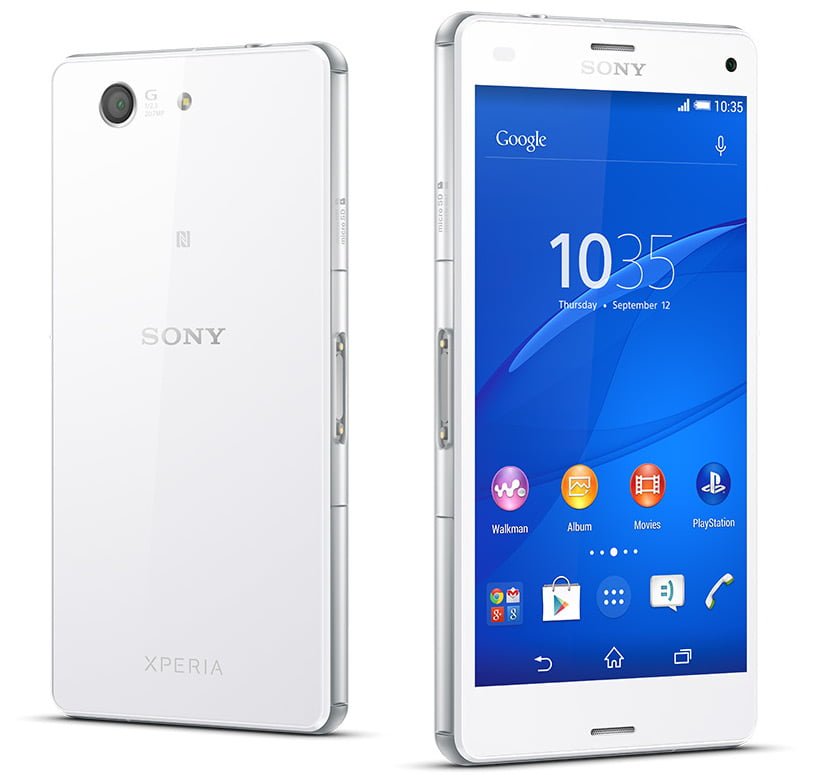
Sony has just taken the wraps off its next flagship device, the Xperia Z3 and joining it is the Xperia Z3 Compact and Xperia Z3 Tablet compact. Let us take a look at what each of the device is offering:

Sony Xperia Z3

Sony Xperia Z3
The new flagship comes in just 6 months after the launch of the Xperia Z2. It comes with a slight upgrade under the hood over the last generation in the form of a 2.5 GHz quad core Snapdragon 801 processor, a 3GB RAM and an Adreno 330 GPU. It gets the same screen as the last one which is a 5.2 inch full HD unit. It sheds off 11 grams of weight over the last generation and loses 1mm of thickness as well.
It makes use of Sony DSEE HX audio technology for an enhanced audio experience and its build quality surely makes you look twice at it.

Sony Xperia Z3 Specifications

  • 5.2-inch Triluminos display with Live Colour LED and a resolution of 1920 x 1080 pixels. It is powered by the X-Reality engine.
  • 2.5 GHz quad core Qualcomm Snapdragon 801 processor, Adreno 330 GPU, 3GB RAM
  • Android 4.4.4 KitKat
  • 16GB of internal storage which can be expanded further by 128GB
  • 20.7MP rear camera with Exmos RS sensor and a 2.2MP front facing camera. The rear camera supports 4K video recording while the front one supports full HD video recording.
  • IP65/IP68 certified for water and dust proofing
  • It tips the scales at 152 grams and its thickness stands at 7.3mm
  • 4G LTE /3G HSPA+, Wi-Fi, Bluetooth 4.0, GPS with GLONASS, MHL 3.0 and NFC
  • Black, white, green and copper colours
  • 3100 mAh Battery with STAMINA mode which allows for usage for a longer duration

Sony Xperia Z3 Compact

Xperia Z3 Compact
Xperia Z3 Compact
The successor to the Xperia Z1 compact packs in quite a punch for a device of its size. It gets a 4.6 inch 720p display which is an up from the 4.3 inch unit of the Xperia Z1 and gets a bigger battery too (2,600 mAh from 2,300 mAh). Sony has tried to keep the essence of making it a mini version of the flagship by carrying over almost everything in the hardware department.

Sony Xperia Z3 Compact Specifications

  • 4.6 inch Triluminos display with a resolution of 1280 x 720 pixels with the X-Reality engine powering it.
  • 2.5 GHz quad core Qualcomm Snapdragon 801 processor
  • Adreno 330 GPU
  • 2GB RAM
  • Android 4.4.4 KitKat
  • 16GB of internal storage which can be expanded further by 128GB
  • 20.7MP rear camera with Exmos RS sensor and a 2.2MP front facing camera. The rear camera supports 4K video recording while the front one supports full HD video recording.
  • IP 65/68 certified for water and dust proofing
  • Its thickness stands at 8.9mm and weighs 129 grams
  • 4G LTE /3G HSPA+, Wi-Fi, Bluetooth 4.0, GPS with GLONASS, MHL 3.0 and NFC take charge of connectvity
  • Black, white, green and orange colours
  • 2600 mAh Battery with STAMINA mode

Xperia Z3 Tablet Compact

Sony Xperia Z3 Tablet Compact
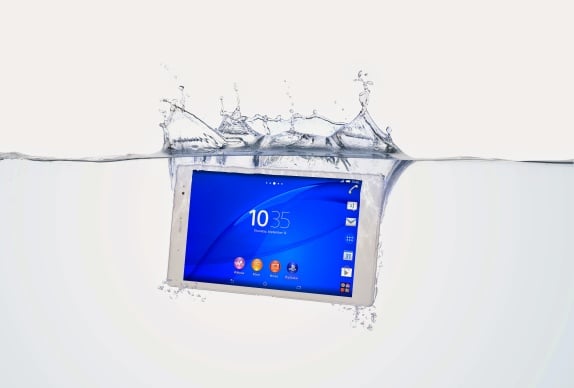
Sony likes to call its the “slimmest and lightest waterproof tablet” and it is basically a Sony Xperia Z3 packed into a tablet. It will be one of the better tablets when it goes on sale. The tablet will pose quite a lot of threat to the likes of the Nexus 9 and the next generation of iPad Mini. It has an 8 inch display with Contrast Enhancement. It comes with a matte rear finish and ditches the glass panels of the Xperia Z3 for it.

Sony Xperia Z3 Tablet Compact Specifications

  • 8-inch display, 1920 x 1200 pixels
  • Android 4.4.4 KitKat
  • 2.5GHz quad-core Qualcomm Snapdragon 801 processor, Adreno 330 GPU, 2GB RAM
  • 16GB of internal storage which can be expanded further by 128GB
  • 8.1MP rear camera and 2.1MP front camera
  • IP 65/68 certified for water and dust proofing
  • Its thickness stands at 6.4mm and weighs 270 grams. This weighs pretty less when compared to many and slim waistline makes it really easy to hold it.
  • Black and white colours
  • 4500 mAh Battery which provides upto 13 hours of video playback
The three devices will be launched in October globally and their pricing will be one of the key factors determining their success.
, ,

IFA 2014: Sony Xperia E3 and Xperia E3 dual announced with 4.5-inch screen

Sony has just launched the Xperia E3 and Xperia E3 dual at their IFA 2014 event. The E3 Dual as the name suggests is just the dual-SIM version of the regular Xperia E3.  The Xperia E3 will be a mid-range Android smartphone aimed at the likes of the new Moto G. It comes with 1.2GHz quad-core Snapdragon 400 processor coupled with Adreno 305 GPU and 1GB of RAM. It brings LTE connectivity on a budget.

  • 4.5-inch LCD display,  854 x 480 pixels, capacitive multitouch
  • Android 4.4 KitKat
  • 1.2GHz quad-core Qualcomm Snapdragon 400 processor, Adreno 305 GPU, 1GB RAM
  • 4GB of internal storage, microSD card slot (up to 32GB)
  • 5MP primary camera with autofocus and LED flash, VGA front-facing secondary camera
  • dual SIM, 4G LTE, 3G HSPA+, Bluetooth v4.0, Wi-Fi, GPS with A-GPS and microUSB v2.0 port
  • 2330 mAh battery, STAMINA Mode
  • Colours: Black, White, Lime and Copper
It will succeed the Xperia E2 and will look towards bringing 4G LTE experience on a budget. Let us see how things pan out for it in the future.

Tuesday, May 20, 2014

,

Samsung Galaxy S5 price drops to Rs 40,000 on various online stores

After being launched at an exorbitant price of Rs 51,500, the Samsung Galaxy S5 price has been dropping significantly. As we reported, the first price drop for Galaxy S5 came in late last month when it dropped to Rs 46,000 on Flipkart. After the news spread, Samsung came out and clarified that they did not drop the price officially. But today, prices of the Samsung Galaxy S5 have been dropped around Rs 40,000 on multiple online stores including Flipkart, Amazon and IndiaTimes Shopping.
Samsung Galaxy S5 Price In India
At this price, buying the Galaxy S5 seems worth the money. Its rivals, Apple iPhone 5S, HTC One M8 and Sony Xperia Z2 are priced at Rs 46,560, Rs 44,995 and Rs 44,999 respectively. All these rival smartphones are priced over Rs 5,000 higher than the Galaxy S5. This has been the case with Samsung’s flagship smartphone offerings every year. Samsung manages to launch its smartphones earlier than other brands and then keeps on dropping the prices faster than its rivals to attract more buyers. Would you buy the Galaxy S5 at this price? Or would you still shell out some extra money for better alternatives?

Wednesday, May 14, 2014

, , ,

Motorola Moto E launched in India with an aggressive price of Rs 6,999

Motorola has finally launched the Moto E in India after the smartphone was leaked in all its glory a few days ago. The specs are similar to the ones that were rumoured and the smartphone will go on sale at midnight on Flipkart with a slew of offers. You’ll get 50 percent off on its covers and e-books worth Rs 1,000 if you purchase the device today. Flipkart will also offer you a 50 percent discount on an 8GB Transcend memory card if bought alongside the device. Here are the specifications of the device:

Motorola-Moto-EMotorola Moto E Specifications

  • 4.3-inch display with a resolution of 960 x 540 pixels and Corning Gorilla glass 3 on top of it
  • 1.2 GHz dual-core Snapdragon 200 processor
  • 400 MHz Adreno 302 GPU
  • 1GB RAM
  • Android 4.4 KitKat
  • 4GB internal storage, expandable by another 32GB with a microSD card
  • 5MP rear camera without flash, no front camera
  • Dual SIM, 3G, WiFi 802.11 b/g/n, Bluetooth 4.0 and GPS for connectivity
  • 1980 mAh battery
Motorola has hit the bull’s eye with its pricing and the smartphone will be made available black and white colours alongside the option of changing back panels like its other siblings being on offer as well. In our opinion, this is pretty much the best sub Rs 7,000 device and Motorola is all ready to replicate the success of the Moto G with Moto E.
, , ,

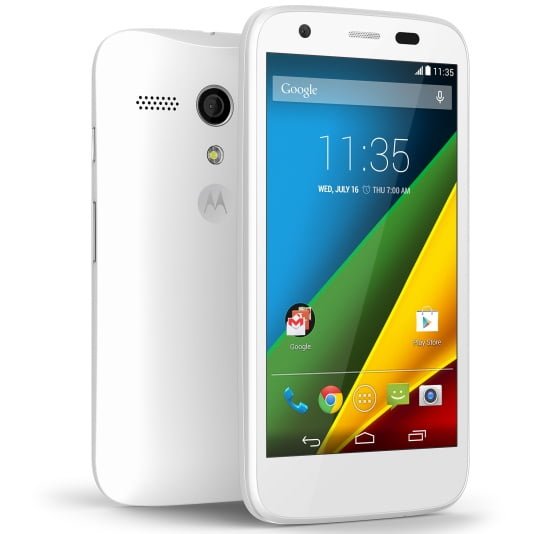
Motorola updates the Moto G with 4G LTE connectivity and microSD card slot

Right after the Moto E was announced in India at an aggressive price of Rs 6,999, Motorola at its launch event in UK announced an upgraded version of the Moto G which makes it an all the more a value for money device. Motorola has given it the a complete white colour option, 4G LTE connectivity and added the much awaited microSD card slot to it. Yes, you read it correct!
Motorola Moto G LTE
Motorola Moto G LTE In White

Motorola Moto G 4G LTE Specifications

  • 4.5-inch display, 1280 x 720 pixels, 329 ppi, Corning Gorilla Glass
  • 1.2 GHz quad-core Qualcomm Snapdragon 400 processor, Adreno 305 GPU
  • 1GB RAM, 8GB internal storage (6GB user available), microSD card slot (up to 32GB)
  • 4G LTE, 3G, Wi-Fi 802.11 b/g/n, Bluetooth 4.0 and A-GPS
  • 2070 mAh battery
It has been announced for GBP 149 which converts to around $219. The 8GB regular variant which costs $179 globally costs Rs 12,499 in India and the 16GB variant which costs $199 costs Rs 13,999 and judging by that, the 4G LTE variant should cost Rs 15,499. At that price, it would still be quite a good device for India. Even though the 4G roll out is still in its nascent stages, the device will make for a good one if brought to Indian shores.
, ,

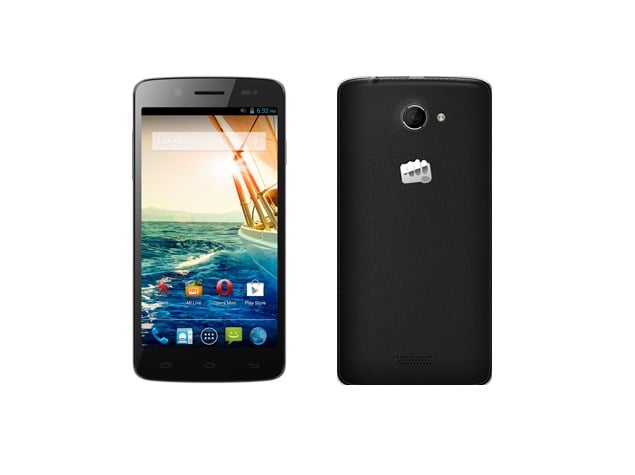
Micromax Canvas Elanza 2 with 5 inch screen and quad-core processor launched in India for Rs 9,340

Micromax is constantly launching more and more budget devices in the country and the latest device to hit the market is the Canvas Elanza 2 priced at Rs 9,340. It comes across as a successor of the Canvas Elanza launched back in February.
Micromax Canvas Elanza 2

Micromax Canvas Elanza 2 Specifications

  • 5-inch capacitive display with a resolution of 1280 x 720 pixels
  • 1.2 GHz quad-core Snapdragon 200 MSM8212 processor, 1GB RAM
  • 4GB internal storage, microSD card slot (up to 32GB)
  • Android 4.3 Jelly Bean
  • 8MP rear camera with LED flash and a 2MP front snapper gets coupled with it.
  • 3G HSPA+, WiFi 802.11 b/g/n, Bluetooth 4.0 and GPS take charge of connectivity
  • 2000 mAh battery
  • Faux-leather back and Dual SIM functionality
  • Rs 9,340
The Micromax Canvas Elanza 2 comes with a Snapdragon 200 processor which uses an older fabrication process and hence is not quite as good a performer as the MediaTek quad-core unit. Apart from the processor, Micromax has priced it right and it provides decent amount of value for money spent.

Wednesday, March 26, 2014

, , , , , ,

Fleksy keyboard for Android now has achievement badges and cloud syncing

Even though Fleksy's predictive touch typing is fairly easy to learn, not everyone is familiar with all that this alternative keyboard has to offer. That's one of the reasons the company has incorporated a new Badge system in Fleksy's latest 2.0 update for Android, to hopefully have users spread its gospel and get a bit of fun out of it as well. For example, if you're able to type on Fleksy's invisible keyboard, you'll get an "Invisible Master" badge, or a "Gesture Guru" stamp if you have those special swipes down pat. You can show off your badges to your buddies of course, but their main value is in introducing new color themes or prolonging Fleksy's free trial period. Another addition to Fleksy 2.0 is a new cloud feature that lets you sync personalization features across your various Android devices. Things are moving ahead on the iOS side as well, as Fleksy has updated its SDK with eight new languages and improved typing precision. Around 50 iOS developers have already incorporated the Fleksy keyboard into their apps, many of which are featured here. For those on Android who have yet to try the full version of Fleksy, you would be wise to get it soon -- the app will be 50 percent off ($1.99) for the next 72 hours only.

0 Comments Share

Source: Google Play, Fleksy

Tags: android, fleksy, ios, keyboard, mobilepostcross Next: HTC's new One will also come as a minimalist Google Play Edition .fyre .fyre-comment-divider

View the Original article

Tuesday, March 25, 2014

, , , ,

The new HTC One vs. the competition: the battle of Android flagships rages on

We all knew it was coming, and after a lengthy list of leaks, the new HTC One is finally official. This time of year is known for its gaggle of new handsets, so we've lined up the latest offerings so you can see for yourself how they stack up. Flagships from Samsung, Sony and LG are all here to see which mobile device will nab an edge on paper. Want to compare these to your current daily driver? Mosey on over to our comparison tool to do just that. Otherwise, head past the break for our neatly compiled list of specs and form your own analysis of the lot.

HTC One (2014)Samsung Galaxy S5Sony Xperia Z2LG G Pro 2Starting price$199-$249 (on-contract)N/AN/AN/AKnown Dimensions5.76 x 2.78 x 0.37 inches (146.36 x 70.6 x 9.35mm)5.59 x 2.85 x 0.32 inches (142 x 72.5 x 8.1mm)5.78 x 2.89 x 0.32 inches (146.8 x 73.3 x 8.2mm)6.22 x 3.22 x 0.33 inches (157.9 x 81.9 x 8.3mm)Weight5.64 oz. (160g)5.11 oz (145 g)5.57 oz. (158g)6.07 oz. (172g)Screen size5.0 inches5.1 inches5.2 inches5.9 inchesScreen resolution1,920 x 1,080 pixels (441ppi)1,920 x 1,080 (432ppi)1,920 x 1,080 pixels (424ppi)1,920 x 1,080 pixels (377ppi)Screen typeS-LCD3Super AMOLED Full HDTriluminos Full HD (IPS)Full HD IPSBattery2,600mAh (non-removable)2,800mAh (user removable)3,200mAh3,200mAh (user removable)Internal storage16GB/32GB16GB/32GB16GB16GB/32GBExternal storagemicroSD (up to 128GB)microSD (up to 128GB)microSD (up to 64GB)microSDRear camera4MP, UltraPixel sensor, Duo Camera, dual LED Smart Flash, BSI sensor16MP, LED flash20.7MP, LED flash13MP, LED flash, OIS

View the Original article

Monday, March 24, 2014

, , , , ,

Ask Google Search on Android to 'play some music' and... it will

Sometimes, having your entire music collection in your pocket can be a bit overwhelming. When there are hundreds (or in our case, thousands) of tracks at your disposal, where do you even begin to listen? To help thwart that paralysis of choice, Google is going to do the guessing for you with its latest tweak to Search. From Google Now or the search bar, simply say the magic words "play some music" and your Android device will start playing a random Play Music "I'm feeling lucky" mix that's based on recent listening habits. With its deep catalog of tunes, it's pretty easy to imagine that this feature's benefits increase exponentially if you're paying for Mountain View's All Access service, too. Subscriber or not, though, if you're stuck in a Nine Inch Nails rut, this could be the ticket out.

0 Comments Share

Source: Google

Tags: android, google, GoogleMusic, GooglePlayAllAccess, mobilepostcross, music, search, VoiceSearch Next: Titanfall on PCs will soon support 4K and NVIDIA's latest graphics tricks (updated) .fyre .fyre-comment-divider

View the Original article

Saturday, March 22, 2014

, , , ,

AT&T Moto X finally gets Android 4.4.2 update

"http://i-cdn.phonearena.com/images/article/50030-thumb/The-all-new-HTC-One-HTC-M8-rumor-round-up-camera-specs-release-date-and-design-pictures.jpg" alt

View the Original article
, , , , , ,

64-bit Android smartphone might not come until later this year or in early 2015

Apple might have surprised its rivals by stuffing a 64-bit A7 chip into the Apple iPhone 5s. Right away, there was talk that next-gen Android models would also use a 64-bit architecture. But despite those lofty expectations, the word is that Samsung and other Android manufacturers have pulled back on the idea of a 64-bit mobile CPU powering Google's open source OS. According to media reports out of Korea, one problem is that Android does not fully support the 64-bit silicon, although Google is said to be working on resolving some of the problems.

The other problem revolves around the D-RAM market. Costs of producing mobile D-RAM memory has been on the rise and the Korean media is reporting that to produce the kind of D-RAM memory required to support a 64-bit mobile CPU, chip makers would be forced to revamp production lines. This would lead to delays and low yields (initially, at least). Prices would rise even further.

According to industry insiders, we could be looking at later this year or some time in 2015 before a 64-bit Android model is available.

Thanks for the tip!

source: ETNews (translated) via GforGames
Share: Discuss45 Tweet

View the Original article

Monday, March 17, 2014

, , , , , , ,

Microsoft doesn't want Android and Windows dual-OS devices to happen either

Since the beginning of the year,various manufacturers have been pitching dual-OS devices that bootAndroid and Windows 8 (desktop and Windows Phone). Yesterday, Huaweiannounced that it will introduce a dual-OS handset soon. Beforethat, ASUS was to ship its Transformer Duet TD300 dual-bootingtablet, but it was stalled in its tracks by Google. This revealed a serious obstacle for the dual-OS concept - industry pressure.


So far, our assessment of the situationwas that dual-OS devices represent a chance for Microsoft topiggyback on Android's popularity to increase Windows' market share,which is something Google would understandably object to. But thereality might be different. According to analyst Patrick Moore, whileGoogle "wants all-Android devices", Microsoft too wouldrather have all-Windows devices, because dual-OS will let Androidenter the Windows-dominated PC market. Google is already trying tocompete in this space with its Chromebook laptops, and dual-bootingdevices could give them another, even more comfortable entry pointinto a territory that Microsoft wants for itself.


Allegedly, an internal ASUS memo aboutits 2013 AIO PC dual-OS desktop computers revealed that Microsoft has anew policy of not supporting dual-booting products, which is why theTaiwanese company will stop selling them. As a whole, the fate of future dual-booting devicesis unclear at this point. Although Chinese and Taiwanese vendors arequite interested in the concept, and Intel has done a lot of technological work tobring it to fruition, it seems that Google and Microsoft have thelast word on it, for now.


source: WSJ

Share: Discuss25 Tweet

View the Original article
, , ,

10 great icon packs to liven up your Android

We'll be repeating ourselves here, but we just can't say no to the endless stream of customization options that Android offers. Chief among those, in our opinion, is the ability to visually tweak away and create a UI that is yours and yours alone, and the various icon packs are one of the most profound ways to go about that.
We've picked 10 icon packs for you to choose from, and we put great care to only select the really good ones. That said, we're not at all saying that these are the best -- there just are so many of those right now, that we wouldn't be able to go through all of them even if we spent an entire day browsing the web. What we have here is still pretty great, though.
Now, there's a catch, like most things Android modifications. For these to work, you'll need to be using a qualifying launcher, though we'll be showing you pretty soon how to get icon packs working with the stock launcher. But that's a fight for another day. Regardless, seeing as launcher apps are massively popular, we'd say these will work for a great many of you, so jump right into the slideshow below and take your pick.
10 icon packs to liven up your Android Fullscreen More popular slideshows

View the Original article
, ,

How to enable USB debugging on Android

USB debugging’. 
Enabling USB debugging is the first step required before you start installing custom ROMs, rooting, or any such hackery. Best of all - enabling the setting is extremely simple and quick, and in fact, you can do it in less than a minute.

Before we start, though, let’s just clarify what USB debugging is. A feature aimed mostly at developers, USB debugging opens up direct access to the Android system for the Android SDK (Software Development Kit). You can have the Android SDK downloaded on your computer, but unless you have USB debugging enabled, it won't work with your device. With all this in mind - whether you are a developer or someone who has decided to flash a custom ROM, or simply root your phone - here is how to enable USB debugging on different versions of Android:

KitKat and Jelly Bean (4.2 and later)
1. Navigate to Settings > About Phone > scroll to the bottom > tap Build number seven (7) times. You'll get a short pop-up in the lower area of your display saying that you're now a developer.


View the Original article