Showing posts with label Andriod. Show all posts

Thursday, March 5, 2015

, , , ,

Xolo Q600 Club With A 4.5-Inch Display With DTS Audio

Xolo has unveiled the Q600 Club in India for a price of Rs. 6,499. The company listed it online on its official website, however, the device is already available through many third-party online retailers at a lower price tag.
The Xolo Q600 Club is a Dual SIM smartphone and runs Android 4.4 KitKat out-of-the-box. It comes with a 4.5-inch FWVGA display with a pixel density of 218ppi and 480×854 pixels resolution. It is powered by a 1.3GHz quad-core MediaTek MTK6582M processor with 512MB of RAM along with a Mali-400 MP2 GPU.

The phone sports a 5-megapixel rear camera with LED flash, and a 0.3-megapixel VGA front camera. It features 4GB of internal storage, which can be further expanded up to 32GB via microSD card. The Q600 Club supports connectivity options such as 3G, GPRS/ EDGE, A-GPS, Wi-Fi, microUSB, and Bluetooth 4.0. There are also many sensors on-board such as accelerometer, ambient light sensor, and proximity sensor. It is backed by a 1,800 mAh battery, which is touted by the company to deliver up to 8.67 hours of talk time on 3G and up to 19.69 hours of talk time on 2G. The device measures 131.5 x 66 x 9.7 mm.
Moreover, the Q600 Club is integrated with special box speakers, which supports DTS audio, smart remote solution and Hot-Knot technology to enable data sharing.

Xolo Q600 Club specifications

  • 4.5 inch FWVGA IPS display with 480×854 pixels resolution
  • 1.3GHz quad-core processor paired with 512MB RAM
  • Android 4.4 KitKat out-of-the-box
  • 5MP rear camera with LED flash and VGA front camera
  • 4GB internal storage, expandable up to 32GB via microSD card
  • 3G, GPRS/EDGE, A-GPS, Wi-Fi, microUSB, Bluetooth 4.0
  • 1,800 mAh battery
View the Original article

Saturday, January 4, 2014

, ,

DreamWorks to launch Android 'DreamTab' with original content this spring


DreamWorks certainly knows what kids want to watch, and Android tablet maker Fuhu knows a thing or two about children's tablets -- having produced the Nabi 2 Disney edition model, for instance. It looks like the two are putting that youth savvy together to create a new slate called the DreamTab that'll come with its own stylus and a raft of kids' apps. The studio told the New York Times that it'd launch an eight-inch model this spring for under $300 with content that can interact with other DreamWorks toys or show kids how to draw, for instance. It'll also include other educational apps to further entice parents and could even have animated characters like Shrek tell kids when it's time to shut it down. A 12-inch model will arrive later, and though there's no word on specs yet, DreamWorks said the new models will provide around the same power as an iPad. "If you give a kid less... they won't like it."

Wednesday, December 18, 2013

Spotify's Android and Mac apps get a fresh coat of paint and new artist pages

If you've just noticed that Spotify on your Mac or Android device looks different, you're not seeing things -- there are new updates for both platforms. On Android, the tweaks are quite small, with a new look for the log in and signup pages, along with image galleries and play counts on the artist pages, as shown above. Meanwhile The Verge spotted a new version for Mac computers that seems to be rolling out gradually, with visual changes like a darker theme and a circular artist avatar. There doesn't seem to be any new features or other revisions, though, and you may not be able to get the Mac app in your region yet. If you're keen to switch on Android though, you can check Google Play on your device or at the source.

Tuesday, December 17, 2013

, , , ,

Micromax Canvas 2.2 A 114 and Canvas Blaze MT 500 listed online in India

Micromax has added two new Android based budget smartphones, namely, Micromax Canvas Blaze MT 500 and Micromax Canvas 2.2 A114. These two phones have recently been listed on various online retail portals. Here are the specifications and features of these devices that you need to know-
Micromax Canvas 2.2Micromax Canvas 2.2 A114
  • Display- 5.0 inch (960x540p)  qHD IPS display
  • Operating System- Android 4.2 Jelly Bean
  • Processor, Chipset and RAM- Quad-core MT6582M processor with 1.3GHz CPU speed, 1 GB RAM
  • Memory- 4GB internal memory, expandable up to 32GB using microSD card slot
  • Camera-8.0-megapixel camera rear camera with flash and auto focus, 2.0-megapixel rear camera for self shots
  • Battery- 2000 mAh (Li-Ion);
  • Network- 2G & 3G
  • Connectivity- Dual-SIM, Bluetooth v4.0, Wi-Fi (802.11 b/g/n), micro-USB, microSD card slot, EDGE/GPRS, stereo sound, FM radio (with recording option)

Micromax Canvas Blaze MT 500
micromax-canvas-blaze-mt500
  • Display- 5-inch touchscreen display
  • Processor and RAM- Dual core processor with clock of 1GHz and 768MB of RAM.
  • Operating System- Android 4.2 Jelly Bean
  • Camera- 8-megapixel main camera with autofocus, 0.3-megapixel front camera for self shots
  • Memory- internal memory details are not known but you can expand the memory size up to 32 GB using an external memory card
  • Connectivity - Wi-Fi, Bluetooth, and GPS, dual SIM (GSM+CDMA)
  • Battery- 1,850 mAh battery

Both the handsets have not yet been officially released by the company so the details available are slightly scarce but we expect this to happen pretty soon. Micromax Canvas blaze MT 500 has the list price of Rs 11,999 and Canvas 2.2 A114 can be bought for 12,999. Prices as well as features of these smartphones do not differ by much. The Canvas A114 gets a quad core processor whereas the MT 500 brings CDMA connectivity to the table. Hence, it will be interesting to see if company’s decision to bring out two similar handsets under different series names will be of any use. Just wait for a few days and you will know it all.

Original link - http://telecomtalk.info

Wednesday, December 11, 2013

, , ,

Nokia reportedly building Android phone

The image you see above is the rumored Nokia Normandy, which Twitter leakster @evleaks revealed at the end of last month. While not much was known about the device at the time, the lack of hardware shutter button, capacitive buttons and LED flash indicated that this mystery phone was likely an Asha device intended for emerging markets or budget-minded users. Yet, if a report from The Verge's Tom Warren is accurate, there may actually be a lot more to the Normandy than what we had originally assumed. Warren has checked with multiple sources who claim that the phone is an Android-based device due for a 2014 release.
This may seem like a stretch, given the fact that Nokia's device division is currently awaiting an acquisition with Microsoft, but Warren offers a few points of clarification. First, he says, the Normandy is meant to be a low-end Asha equivalent that features a forked version of Android that isn't associated with Google services, which means Nokia would be able to fully customize it however it wants, much like Amazon does with its Kindle Fire. Doing this would still give Nokia full control over the device ecosystem, while giving users the chance to enjoy full smartphone apps -- something the company has had a difficult time figuring out how to do on the Asha line. The question is, would Nokia rely on a third-party app store or try to set up one of its very own? That's still an unknown, but this is assuming the Normandy even sees the light of day; if the rumor is true, our guess is that this project was already underway before Microsoft's acquisition, and will probably be released before the merger is complete -- if it gets released at all.

Wednesday, November 20, 2013

, , , , ,

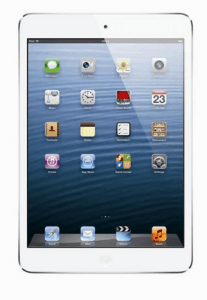
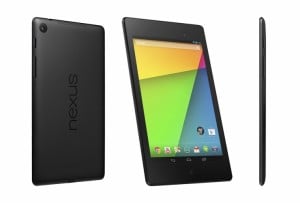
Nexus 7(2013) vs iPad Mini 2

A lot many tablets are coming into the arena, thereby increasing options for the customers. We think it is time to compare a few and determine the best choices. Let us have a comparative look at the Apple iPad Mini 2 and the Google Nexus 7 (2013):
ipad-mini-2-in-indiaBuilt: The dimensions of iPad Mini 2 are 135 x 200 x 7.5 mm and it weighs about 331 and 341 grams (Wi-Fi only and Wi-Fi + cellular variant, respectively). Where as, the dimensions of the Nexus 7 are 120 x 199 x 8.65 mm and it weighs approximately 290 grams and 299 grams (Wi-Fi only and 32 GB + mobile data variant, respectively). Both of them are pretty handy and none of them feels like a weight to carry around so it’s a tie.
Display: iPad Mini 2 offers a 7.9 inch display with a resolution of 2048 x 1536 and a pixel density of 326 ppi which is better in all aspects as compared to the Nexus 7 (2013)’s 7 inch touch display with a resolution of 1920 x 1200 pixels and a pixel density of 323 ppi. Its not about the pixel density and the Retina Display surges ahead of the full HD display.
nexus-7-2013Processor: iPad Mini 2 has been equipped with A7 system chip 64 bit architecture and a M7 motion co-processor. On the other hand, Nexus 7 (2013) has been loaded with a Qualcomm Snapdragon S4 Pro quad core processor clocked at 1.5GHz. It is all about the optimization and Apple surely does it better but there are no two ways to the fact that the Nexus 7 easily matches up to the iPad Mini’s level of performance.
Operating System: iPad Mini 2 functions on iOS 7 where as the Nexus 7 (2013) device works on Android 4.3 Jelly Bean platform. The Android 4.4 Kitkat will be available soon and we’d call it a tie here as it’s a matter of personal choice.
Camera: Both the devices feature a primary camera of 5 mega pixels and a front facing camera of 1.2 mega pixels.
Battery: The Apple iPad Mini 2 runs on a battery powerful enough to offer 10 hours of battery life while the Google Nexus 7 (2013) works on a battery that ensures a battery life of approximately 9 hours.
Price: The rumoured prices of the iPad Mini 2 for the 16GB Wi-Fi variant are expected to start at Rs 28,900 whereas the Nexus 7 32GB variant with LTE will set you back by Rs 25,999 and it is here that it gets a lead the mini offering from Apple finds a bit hard to match.
Our Take: After the careful analysis of the features of these two devices it is safe to say that if you are looking for a value for money, high quality gadget at a low price, then Nexus 7 is a smart choice. However, if you are willing to cough up more cash, iPad Mini 2 will not disappoint you.
, , ,

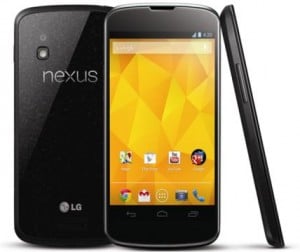
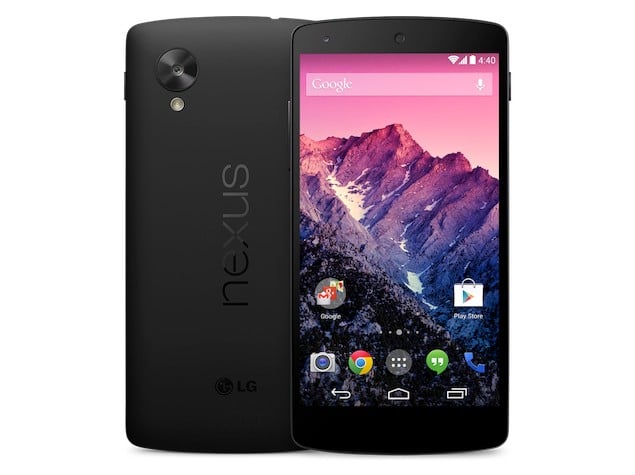
Nexus 4 vs Nexus 5 : Which is better ?

Nexus4-IndiaGoogle’s Nexus 5 is out in the Indian market. While intense discussions about its comparisons with other rival brands are going on, we take this chance to analyze its worth against the predecessor, Nexus 4. Since Google is still continuing with the predecessor, the comparison becomes pretty obvious. Here it is for you- Display- Nexus 5 comes with a 4.95-inch (1080 x 1920 pixels) 445 ppi full true HD IPS capacitive touchscreen as compared to the 4.7-inch WXGA IPS HD (1280x768p), 318 ppi display. While the former has Corning Gorilla Glass 3 protection, the later has Corning Gorilla Glass 2 protection. Hence, its a big leap in terms of display.
Processor, Chipset and RAM- Nexus 5 has  2.3 GHz quad-core Snapdragon 800 processor with 2GB RAM while the predecessor ran on 1.5GHz Snapdragon S4 Pro quad-core processor with 2GB RAM. So, you will surely get significantly better processing experience on the new device as the Snapdragon 800 is the best unit currently.
Memory- 16 and 32 GB internal memory variant come with the new launch while the older one had 8 and 16 GB variants. Both devices have no card slot. Since the newer one offers a bigger memory option, I think this one should go to the Nexus 5.
google_nexus_5Operating System- Nexus 5 runs on Android Kitkat 4.4 platform with many new features. Nexus 4 has been updated v4.3 Jelly Bean platform. However, the Kitkat 4.4 will soon be available to Nexus 4 users. Camera- Both devices have similar 8 MP primary camera and 1.3 MP front camera with features like autofocus, LED flash, Geo-tagging, touch focus, face detection, photo sphere etc. However, the new generation comes with Optical Image Stabilizations) and HDR+ (High Dynamic Range) for better picture quality. The camera is a big up from the previous generation.
Connectivity- Both the devices offer connectivity options like 3G, GPS, Wi-Fi, Bluetooth, NFC, WLAN and USB. However the Nexus 5 comes with LTE support which might be beneficial in future.
Battery- Nexus 5 has Non-removable 2300 mAh battery to give 200 hours of standby and 17 hours of talktime on 2G while on Nexus 4, you will have 2100 mAh battery rated for upwards of 15.3 hours of talk time. Price- For 16 GB variant of Nexus 5, you pay Rs 28,999 whereas the Nexus 4 is selling for around Rs 22,000 for the 16GB variant. You also get the option of a 32GB variant on the Nexus 5 which will set you back by Rs 32,999.
Verdict- Nexus 5 is a significant over Nexus 4 on all counts and is more than worth the price difference. Moreover, this leap comes at no substantial cost escalation. In short, a green light from my side.

Saturday, November 9, 2013

,

Top 5 Instant Messaging Apps

As a wide number of instant messaging applications and services are emerging, staying connected with friends and family from all across the world is becoming even simpler and easier. Let us have a quick look at the top 5 instant messaging apps and determine which one is the best for you:
WhatsAppWhatsApp: WhatsApp is an instant messaging app that uses your phone contacts only. It will display all those contacts that have this app installed. There is no need for you to login. The app saves all your messages offline. WhatsApp is free of charges to download; however, it comes with some in-app purchases. For the first year, your can use this app for free. But after that you will have to pay Rs. 65 every year. Though the fee is not much, but it makes the fully free rivals of WhatsApp even more attractive. Also, you cannot use this application on multiple devices.
wechatscreenWeChat: WeChat is a free instant messaging service that has been introduced this year and is already quite popular. It enables you to send voice messages and carry our Live Chat and video calls. This app is available on Android, iOS, Windows Phone, Nokia S 40 and BlackBerry OS as well. You can link WeChat to your computer with the help of QR codes and chat with friends on desktop browser. With this instant messaging service one can also send files to their device. With the Web Grab plug in, you can shake web pages from your desktop device to your smartphone. It also makes use of your phone number. However, it gives you the freedom to approve request before someone can chat with you.
line-messenger-480x300Line Messenger: Line Messenger is a Japanese based instant messaging app that has been available very recently and works on Android enabled phones. It also functions on BlackBerry, Nokia and iPhone. Line Messenger enables you to send text as well as voice messages. With Line Messenger the user can also make free calls. This is the major reason behind its huge success. This app also allows you to share data, such as photographs and videos with your friends. Line Messenger is free of cost.
Hike-messengerHike: Hike is another immensely popular and widely used instant messaging application. It is simple to use, fast and elegant. Hike enables you to communicate in three different ways. First, it allows you to message Hike-to-Hike. Second, you can send messages to friends who are not using Hike but have a smartphone. However, it is limited to India. Third, you can contact friends with some other phone via SMS. You get free 100 messages every month. Hike enables you share data as well. It comes with a friendly user interface. Hike is also a cross platform service.
BlackBerry-MessengerBBM: BlackBerry Messenger or BBM instant messaging service is perhaps one of the main reasons why BlackBerry devices are so successful. BBM offers superior security and privacy settings as compared to any other instant messaging app. It makes use of user ID or PIN instead of phone numbers. So, this app enables you to authorize people in order for them to chat with you. Therefore, nobody who simply has your contact number can message you. The good news is that BBM has recently been launched for Android and iOS as well. Being a cross-platform service, it will surely become even more popular.
Our Take: After having a good look at these top 5 instant messaging services, my vote goes in the favor of WeChat because as compared to other apps, it is available on maximum platforms. Moreover, it offers some pretty awesome features along with better security and privacy settings. But it has some glitches and Whatsapp provides a decent alternative to it as well. 

Thursday, August 22, 2013

, , ,

Facebook Partners With Shutterstock To Offer Free Stock Images In Its Ad Creator

image002-1
When ads look bad, Facebook, users, and advertisers all lose. So Facebook today announced a partnership to bake Shutterstock into its ad creator, allowing marketers to select from millions of free stock images for their ads. Facebook today also started letting advertisers upload multiple images at a time to build ad variants for A/B testing. Both could make Facebook ads more interesting.
On the mobile side, Facebook updated its Pages Manager app to let admins edit who else controls their page, and publish multi-photo feed posts. Android Page Manager users can tag people in comments and browse a Page Feed of other relevant Pages, while the iOS app now allows for creation of new Pages and events.
So what’s the point of all these updates? To make marketing content on Facebook as interesting as possible so it’s not a turn off for users. No one wants to see bland ads shoved in between fun photos from their friends. Facebook has to make money, but it shouldn’t disrupt the user experience.

Original Article 

Friday, June 28, 2013

Galaxy S4 Owners Android 4.3

jellybean4
Google’s worst-kept secret is the upcoming Android 4.3 update for devices powered by its mobile OS (though a lot more secrets have come to light recently), and we’re starting to see that update make its way to the handsets of owners who aren’t afraid to experiment. SamMobile reports this morning that Android 4.3 has been spotted on both the Google Play Edition and the Snapdragon-powered Galaxy S4, and should work fine on both for users who aren’t afraid to mess around with flashing their ROM and voiding their warranty.
Android 4.3 was first spotted by SamMobile running on the Snapdragon Galaxy S4, which is a version that’s normally running Samsung’s own modified Google OS. Screens depicted an updated camera interface, as well as some other interface tweaks, but by and large the look of 4.3 is very similar to the look of 4.2, the current version of Jelly Bean and the latest officially acknowledged by Google.
Google may not have come out and admitted that 4.3 is in the works, but test builds have been spotted on Nexus 4 hardware as early as a month ago, and I’ve heard from people close to the project that the Android team has been hard at work on the latest update for a while now and continues to make refinements ahead of its public launch.
Google didn’t talk about Android 4.3 at I/O this year, as some expected it would. The developer-focused event was very developer focused this year, and an announcement of a new version of its mobile OS may have attracted attention away from the things it did discuss. Plus, if 4.3 is mostly an improvement and maintenance update like it appears to be, a big reveal might not be what Google is looking for here.
For those of you with a Galaxy S4, either the Snapdragon variant or one of the shiny new Google Edition versions, getting the preview build on your device is pretty easy, and you can find instructions here. Reports claim that all the parts work, too, which is a nice change for pre-release software.
, ,

Netflix Gaming With GamePop Mini, A Free Hardware Option Added By Bluestacks

GamePop Mini
Mobile virtualization startup BlueStacks only recently revealed the GamePop, its mobile home gaming console  that offers all-you-can play gaming for a flat monthly fee, but it’s already expanding the line. Today, the company is announcing GamePop Mini, a version of the GamePop that offers completely free hardware with a standard $6.99 monthly GamePop service subscription, with smaller hardware that’s yours to keep after 12 months even if you decide to cancel your GamePop account.
The GamePop Mini also runs Jelly Bean 4.2, and connects to your TV via an included HDMI cable. Just like its big brother the GamePop, it will provide access to the service’s curated list of 500 games (from both Android and iOS sources) each month, with titles from studios like HalfBrick (makers of Fruit Ninja and Jetpack Joyride) that are normally available only with a one-off purchase. The key difference between the GamePop and the GamePop Mini will be in terms of specs, which BlueStacks aren’t quite ready to reveal.
The $129 GamePop is currently available free to pre-order customers, but reverts to full price as of June 30. The GamePop Mini will become available as of July 1 for pre-order, and BlueStacks CEO Rosen Sharma told me in an interview that it will ship at or around the same time as the GamePop some time this winter. Sharma said a free console was always something that it wanted to do, and that the GamePop Mini is the first of a line of “forever free” options it plans to provide to gamers seeking to access its services.
“We were always planning this, because we think of GamePop as a service,” he said. “Just like when you think of when Netflix came out, they used to send you a Wii disc so you could run it on the Wii, and then you could run it on the PlayStation. And our goal is that you can run it on a number of different devices, and some of them will be from us, and some of them will be from other people.”
GamePop becoming a platform agnostic service would be a considerable departure from other mobile gaming consoles out there, like OUYA and the upcoming GameStick. It would open the door to integration in smart TVs, Windows computers, embedded devices and various other places. Once that happens, the value prospect of a subscription service with true portability increases dramatically; GamePop truly does become the Netflix of mobile gaming.
“It is in part to show how good the market is out there, and I would call it a showcase, but the pre-orders have also inundated us,” Sharma said. “So it’s not just a showcase. The direct channel is a very strong business, and one we plan to continue, but having it run everywhere is our vision.”
Sharma also talked about GamePop’s potential to eventually bring in media titles, as well as interactive experiences that aren’t strictly games, like the Talking Tom series, which is especially a hit with younger audiences. For mobile developers, that presents an option for getting a variety of mobile titles in front of a wide swath of users on a huge range of devices, on a subscription-based billing model that could upturn the pay-per-download revenue scheme that’s mostly driven the mobile software ecosystem to date.
GamePop Mini will be a way for BlueStacks to spread its service far and wide, especially since there’s no commitment, and you need only return the console hardware should you decide to cancel the subscription before the 12 month mark. It’s also super portable, and in fact pocketable, so it’s designed to travel (which has the side benefit of introducing new people to GamePop). I think it’ll be most interesting to see how users react to having both a free and a $129 hardware option for a brand new type of gaming device, but we’ll find out more come winter when they launch.

Vine For Android Gets Updated With Front-Facing Camera Support


biggs
When Vine started shipping for Android, there was one, big, near-universal complaint amongst its users: It didn’t support front-facing cameras. While the existing iOS port had been supporting front cameras for months, Android users looking to take Vine-selfies (Velfies?) were stuck contorting their wrists like some sort of chump. Users were hopeful it’d come baked into the update that shipped last weekend — no such luck.
In an update pushed to the Google Play store just a few minutes ago, Vine for Android finally learned how to play friendly with that front lens.
Meanwhile, this update also brings a few other new tricks: there’s a new upload manager for the Vines you’ve yet to finalize, a few tweaks to the settings screen, and an overall speed improvement — most importantly, the camera is said to load notably faster, now.
Here are the complete patch notes:
• Front-facing camera
• New upload manager for unsubmitted posts
• Improvements to settings
• Improvements to camera loading time and support for more devices
• Speed improvements overall
• Bug fixes and UI improvements
This update comes just five days after the last — a remarkably quick turnaround, from build to build. Say what you will about Instagram pickin’ up video support, but a little competition really does help kick things into gear.
You can find the latest version of Vine on the Google Play store here.

Tuesday, July 31, 2012

,

| | How To Install/Run Whats App messenger On Pc | | Tutorial | |


WhatsApp is popular free messaging client which is available for iOS, Android, Nokia and Blackberry, but still we have no client for Windows PC officially released by the WhatsApp team. Well you can imagine having WhatsApp on your PC and how fast you will be able to send and receive text messages as you always be on one device so you can handle everything right there. So we found an unofficial client which is supposed to be a dummy version of Android running on your PC.


Whatsapp is one of the most popular cross-platform

messaging app

available across iOS, Android, Blackberry & Symbian S60 platforms. And these phones can message each other irrespective of which OS they are running (unlike the hugely popular BBM which only works acrossBlackberry devices). Because WhatsApp Messenger uses the same internet data plan that you use for email and web browsing, there is no cost to message and stay in touch with your friends.

In addition to basic messaging ─ iPhone, Android, Nokia and BlackBerry WhatsApp Messenger users can send each other unlimited images, video and audio

media messages.

But in case you don`t have a data plan on your mobile or want to chat with long texts , then you definitely wish you could use it on your laptop or PC. While there is no official WhatsApp application available for Windows PCs , you can still use it by applying a workaround thanks to

 TrNaSe 

from XDA-developers. Lets have a look at how to do that and get chatting with your friends in minutes:

Pre-requisites to run WhatsApp Android on Windows PC
·        
Any Android Emulator ─ we will use YouWave in this case ( This is a paid application, but Google is our friend

☺

)

·        
WhatsApp.apk ─ you can download it from the WhatsApp website

→


Here


or get it through Titanium Backup on your Android phone (provided you have created a backup)


How to use WhatsApp on a Windows PC

1.   
Download and install YouWave on your windows machine
2.   
Run YouWave ( First Run may take some time to initialize) then Click on Help » Instructions to see the path of your working directory
3.   
Now copy the WhatsApp.apk file in to the directory OR you can also download it within the emulator through Android AppStore.
4.   
Click on View » Redraw Icons and you will see WhatsApp shortcut
5.   
Configure WhatsApp on Windows PC
6.   
Run WhatsApp on YouWave by double clicking it
7.   
Register using mobile phone (Use a phone number other than the one that is already registered with WhatsApp) and Proceed for verification
8.   
You may not be able to verify using

SMS

so wait till it asks for call verification
9.   
You will now get call from WhatsApp (On the phone

number you used for registration, so make sure you have that phone handy) for the verification code which you need to enter on screen

Thats it.

Now your WhatsApp is configured for using on PC with the given phone number. You can add contacts the same way you do for your Android phone and start using WhatsApp.

Nifty, ain’t it? So go ahead, give it a try, and let us know what you think of it in comments below.

------------------------------------------------------------------------------------------------------------ *~ Alternate Method ~*


BlueStacks App Player Android Emulator :
BlueStacks App Player helps you install WhatsApp and thousands other application because its an Android operating system running on your Windows PC. Now obviously its not like you will get that same kind of experience you can do with a touch phone and Android installed on it but still if you are a WhatsApp fan than I must that this software is must for you because WhatsApp experience on this one is simply unbelievable faster texting and media exchanging.


Steps to Install WhatsApp on BlueStacks App Player :
So if you are interested in using WhatsApp right on your PC that you can grab some installation knowledge from below and start experiencing right now.
1. Download BlueStacks App Player for Windows PC.
2. After you have downloaded the above software, start installing it and it will start downloading its package from the internet, it will take some time so sit back and have a cup of coffee.
3. So after downloading it will install and now you will see their user interface, now you have to sign up for your new account or if you already have their account than you can login.

4. Now just search for the WhatsApp like in the above image or find it from the popular downloads hovering right above in the Rocket Dock, after you find it click on it and it will start downloading the app.
5. After WhatsApp is installed click on it and you will see a Terms and Conditions page where you have to click on Agree and than you will be on their main phone verification page.

6. Now just select your country and than insert your mobile number and than click on OK.

7. Now it will start the process of sending you the verification message on your mobile, if that thing fails you also have an option to call your number for the verification message. So now just insert that code and click on OK boom you have successfully activated your WhatsApp messenger on your Windows PC.

8. So now WhatsApp is ready for some action, select your already created groups, if you were having one on your mobile or you can start sending text or media messages to your friends and create another new group, so I was just messing around my group Wild Hogs, and tried sending some messages and delivery was amazingly fast and responsive.
So now enjoy WhatsApp on your Windows PC with this amazing BlueStacks App Player, well you can also download and install other amazing Android Application which you can search and than download, hope you liked this lengthy tutorial, please share it with all your friends.


Thursday, April 5, 2012

, ,

Opera Mobile adds extension support


Opera remains one of the most popular mobile browsers in the world, and now they’re offering up a fresh experimental build for Android users who want to further personalize their browsing experience. The new release offers support for the many extensions that can be installed from Opera’s gallery.
Developer Andreas Bovens notes that this is an early Opera Labs release they’re making available, and there are still plenty of bugs to work out. More surprisingly, he says that there’s no guarantee as of yet that extension support will be officially added to Opera Mobile.
While that may be the truth, it contradicts something Bovens mentions later in the post: that every aspect of the original extensions API for Opera’s desktop browser was designed with mobile in mind. If that’s the case, it seems  highly unlikely that Opera would really leave Mobile users out in the cold.
If you decide to take the Opera Mobile Labs build for a spin, there are a few caveats. Speed Dial extensions aren’t supported and extensions that rely on keyboard or mouse input may not function as expected when hooked into your device’s touchscreen. Extensions that utilize pop-up windows can also behave a bit strangely since they’re forced into tabs at the moment — though Opera will be implementing a different behavior in future iterations of the browser.
Several of Opera’s most popular extensions work just fine, including recognizable names like Ghostery and LastPass. Opera AdBlock works nicely too, and it’s certainly worth installing if you like to be frugal with your mobile bandwidth usage.
Don’t have an Android device to test the new Opera Mobile on? They have also posted emulators for Windows, Mac, and Linux that let you launch it in a window that can simulate the screen sizes and pixel density of several popular phones and tablets.
More at Opera