Update: That was quick; Gmail, Google
View the Original article
Showing posts with label Gmail. Show all posts
Showing posts with label Gmail. Show all posts
Sunday, January 26, 2014
Gmail and other Google services go down (update 2: outage details)
and a host of other Google services have gone down or otherwise broken. The company's status board doesn't show any issues, but Gmail users are seeing notices that their accounts are "temporarily unavailable." We're reaching out to Google and will let you know if there are any updates.
Talk About Timing: Google’s Reliability Team Sat Down For An AMA Right Before Gmail Exploded
Got a tip? Let us know.MenuSearchNewsChannelsStartupsMobileGadgetsEnterpriseSocialEuropeAsiaCrunchGovCrunchUTrendingYahooAppleFacebookTwitterGoogleMicrosoftNSATCTVShowsTCTV NewsAsk A VCCrunchWeekFly Or DieFoundationFounder StoriesTechCrunch GadgetsGillmor GangKeen OnTC CribsTechCrunch MakersAll ShowsAll VideosEventsTechCrunch EventsDisruptCrunchiesMeetupsInternational City EventsHackathonHardware BattlefieldNews AboutSXSWCESE3All EventsSearch TechCrunchSearch TechCrunchSearchCrunchBaseFollow UsFacebookTwitterGoogle
View the Original article
View the Original article
Wednesday, February 8, 2012
Create Fake Login Page of any site with Super Phisher Tool

If you are a beginner and you want to know how Phishing works, then follow my previous post


How To Hack Email Account- E-mail Hacking
First of all let me specify some key features of this Phishing tool :-
* Simple and easy tool which can be used even by a 10 years old boy.
*Create any fake page. For ex- Facebook, Gmail, Yahoo, Hotmail, etc.
Steps to create your own Fake Page:-
* Download Super Phisher here & Extract it.
*Run it
*Fill the Boxes
* In the [url of login box] Type that url which you want to make fake page
ex :-www.facebook.com/login.php
*2nd your password txt file prateek'slogs.txt
*name of fake page file same as phish.php
*site to be redirected after login of victim
1)
2) This is the Output folder where the fake page has been created.
3)These are the Fake pages which are created by the Super Phisher.

Thanks for reading this article. If u face any problem, feel free to ask.
Wednesday, January 4, 2012
How To Hack Gmail Password Using Gmail Hacker [TUTORIAL]
THIS POST IS FOR EDUCATIONAL PURPOSES ONLY.
This is a very awesome app and a great trick to hack someone’s gmail account – Gmail Hacker.!
This Gmail hacker is one of my favorite software to hack Gmail password. The only thing you have to do is to build your own Gmail Hacker and send this Gmail hacker to the victim. I’ve provided the link below for the download:
2. download gmail hacker from this link
3. Download Winrar/winzip to extract Gmail hacker folder.

5. Enter in your email address and password (** I RECOMMEND CREATING A FAKE ID AND ENTER THE DETAILS OF THAT FAKE ID ONLY** So that people should not have a fear of losing their real email IDs in a doubt about this application ) and hit on Build. Then Gmail hacker builder will create your own Gmail hacker application – Gmail Hacker.exe file which you can use to hack gmail password.
6. Now, send this Gmail Hacker.exe file to victim and tell him that this Gmail hacker is used to hack Gmail password. Ask him to run Gmail Hacker.exe and enter all information (which includes his Gmail id and password plus Gmail ID of the victim he wanna hack).
6. Now, send this Gmail Hacker.exe file to victim and tell him that this Gmail hacker is used to hack Gmail password. Ask him to run Gmail Hacker.exe and enter all information (which includes his Gmail id and password plus Gmail ID of the victim he wanna hack).

7. As he enters the information and hits “Hack Them”, he will receive an error message as shown below:

7. In return, you will receive an email in your email account like this:
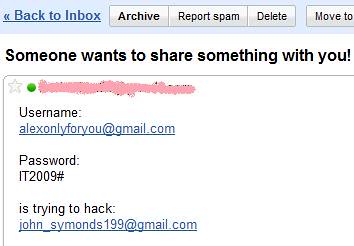
9. You’re Done!! You got his Gmail ID n password!

Saturday, December 31, 2011
Access Gmail Offline !! Read Mail Without Internet Connection !!!

- Open your Chrome browser and download Offline Gmail Extension from here.
- Install this extension by clicking on Add to Chrome and select offline Google Mail.

- After this select Allow offline Mail option and click on Continue button.(Don’t use it on public computer or any network computer because it will store all your data on it)

Your Gmail account will automatically get synchronized whenever you run chrome browser in availability of internet connection.
Saturday, December 24, 2011
Get rid of the Chat box in Gmail
I think most of us use gtalk application for chatting. Isn't it? Then why do we want chat option in gmail? It's quite boring and takes major part of the time to load the page. By doing a simple tip we can completely get rid of the chat box in gmail and save lots of time to load the page.

Go to your Gmail Settings page, switch to the Chat tab, choose “Chat Off” and click the “Save Changes” button. Alternatively, you may use this link to directly access your Gmail Chat settings page. You can re-enable chat in your Gmail by using the “Chat On” option.

Go to your Gmail Settings page, switch to the Chat tab, choose “Chat Off” and click the “Save Changes” button. Alternatively, you may use this link to directly access your Gmail Chat settings page. You can re-enable chat in your Gmail by using the “Chat On” option.
This setting to disable chat may have been available in regular Gmail accounts for some time but it was only recently added to Gmail for Google Apps accounts.
Subscribe to:
Posts (Atom)


